Cypress Syntax Documentation
Learning the syntax of a new tool is best done through practical examples. Let's start by visiting example.com and performing some basic assertions.
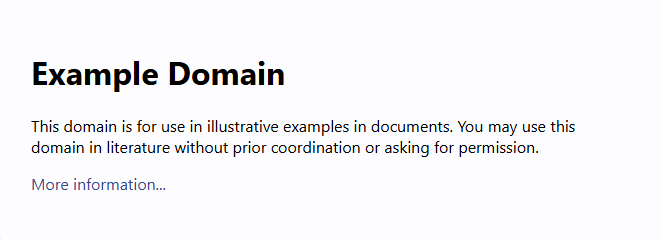
In this example, we will:
- Visit the
example.comwebpage. - Check if the text "Example Domain" exists.
- Verify that this text is within an
h1tag.
Cypress Code
Below is the Cypress code to achieve the above steps:
describe('Example Domain Test', () => {
  it('should visit example.com and check for "Example Domain" in h1 tag', () => {
    // visit the example.com page
    cy.visit('https://example.com');

    cy.get('h1') //check if there is a h1 tag
    .should('contain', 'Example Domain'); //assert if it contains text 'Example Domain'
  });
});
Commonly used Cypress Functions
| Function | Description | Usage Example | Parameters |
|---|---|---|---|
cy.visit() | Navigates to a given URL. | cy.visit('https://example.com') | url (string): The URL to navigate to. |
cy.get() | Gets one or more DOM elements by selector. | cy.get('button') | selector (string): The selector to query the DOM. |
cy.contains() | Gets DOM elements containing the specified content. | cy.contains('h1', 'Welcome') | selector (string): The selector to query the DOM. content (string): The content to search for. |
cy.click() | Clicks a DOM element. | cy.get('button').click() | None |
cy.type() | Types text into a DOM element. | cy.get('input').type('Hello, World!') | text (string): The text to type into the element. |
cy.should() | Makes an assertion about the current subject. | cy.get('button').should('be.visible') | assertion (string or function): The assertion to make. value (any): The value to assert against. |
cy.expect() | Makes an assertion about a value. | cy.expect(true).to.be.true | actual (any): The value to assert. expected (any): The expected value. |
cy.find() | Finds descendant DOM elements of the current subject. | cy.get('ul').find('li') | selector (string): The selector to query the descendants. |
cy.first() | Gets the first DOM element within a set of DOM elements. | cy.get('li').first() | None |
cy.last() | Gets the last DOM element within a set of DOM elements. | cy.get('li').last() | None |
Detailed Parameters for cy.should()
The cy.should() function is highly versatile and can accept various parameters to make assertions. Here are some common parameters:
| Assertion | Description | Example |
|---|---|---|
be.visible | Asserts that the element is visible. | cy.get('button').should('be.visible') |
be.hidden | Asserts that the element is hidden. | cy.get('button').should('be.hidden') |
be.disabled | Asserts that the element is disabled. | cy.get('button').should('be.disabled') |
have.text | Asserts that the element has the specified text. | cy.get('h1').should('have.text', 'Welcome') |
have.value | Asserts that the element has the specified value. | cy.get('input').should('have.value', 'testuser') |
have.class | Asserts that the element has the specified CSS class. | cy.get('div').should('have.class', 'active') |
have.attr | Asserts that the element has the specified attribute. | cy.get('a').should('have.attr', 'href', '/dashboard') |
have.prop | Asserts that the element has the specified property. | cy.get('input').should('have.prop', 'disabled', true) |
-
Function Assertions:
- You can pass a function to make custom assertions.
- Example:
cy.get('button').should(($btn) => { expect($btn).to.have.text('Click Me'); }) -
Chaining Assertions:
- You can chain multiple assertions using
and. - Example:
cy.get('button').should('be.visible').and('have.text', 'Click Me') - You can chain multiple assertions using
When to Use cy.should(), cy.get(), cy.find(), and cy.contains()
Understanding when to use each command ensures efficient and effective test writing. Let’s explore their distinct purposes in detail:
| Command | Purpose | When to Use |
|---|---|---|
cy.should() | Makes assertions about the current subject. | Use to validate the state, property, or visibility of an element. |
cy.get() | Selects elements by their DOM selectors. | Use to locate elements by tags, classes, IDs, or attributes in the DOM. |
cy.find() | Finds descendant elements of an already-selected element. | Use when narrowing scope to child elements within a specific parent. |
cy.contains() | Finds elements containing specific text. | Use to locate elements where displayed text is a unique identifier. |
Detailed Explanation with Examples
1. cy.should()
The cy.should() command is used for assertions to verify that an element’s state or properties meet specific expectations.
- Check visibility:
cy.get('button').should('be.visible'); - Assert element text:
cy.get('h1').should('have.text', 'Welcome'); - Custom assertions:
cy.get('input').should(($input) => {
  expect($input).to.have.value('testuser');
});
2. cy.get()
The cy.get() command is the starting point for selecting DOM elements using CSS selectors.
- Select by class:
cy.get('.btn-primary'); - Select by attribute:
cy.get('input[type="email"]'); - Select by ID:
cy.get('#login-form');
3. cy.find()
The cy.find() command is used to narrow down a selection to descendant elements.
- Find a button within a specific container:
cy.get('.modal').find('button.confirm'); - Find all list items within a list:
cy.get('ul.menu').find('li');
4. cy.contains()
The cy.contains() command is used to find elements containing specific text, making it ideal for dynamic content.
- Find any element with specific text:
cy.contains('Submit'); - Find text within a specific tag:
cy.contains('h1', 'Welcome Back'); - Find text in a scoped container:
cy.get('.navbar').contains('Logout');
Combining Commands
You can combine these commands to create more complex queries and validations.
-
Example 1: Find a button inside a modal and validate its text:
cy.get('.modal').find('button').should('have.text', 'Confirm'); -
Example 2: Verify dynamic text inside a container:
cy.get('.content').contains('Welcome').should('be.visible');
For more detailed information, refer to the official Cypress documentation